|
|
|

|
|
|
SCAN ALL YOUR DOCUMENTS ANYWHERE
SCAN YOUR CONTRACTS, DOCUMENTS & RECEIPTS ON THE ROAD
IRIScan Anywhere 3 is designed to help you stay organized and optimize your time. No more need to run back to the office or home in order to send that contract or even revise it. IRIScan Anywhere 3 allows you to:
Enjoy today a more organize and time effective way of doing business! Enjoy this special offer. Order it today for $79.00 |
 |
Scannen Sie Ihre Dokumente – überall
Briefe, Verträge, Rechnungen, Belege, handschriftliche Korrespondenz, Fotos oder Visitenkarten. Scannen Sie alles und überall!
Laden Sie den Scanner einfach mit einem USB-Kabel auf, nehmen Sie ihn ab und scannen Sie überall ohne Computer. Die gescannten Visitenkarten werden im internen Speicher (512 MB), auf der SD-Karte (inkl.) oder einem USB-Speichermedium gespeichert. |
Greifen Sie auf Ihre Dokumente zu – überall
IRIScan™ Anywhere 3 ist mit dem neuen Readiris™ 14 ausgestattet, sodass Sie Ihre Dokumente einfach und sicher in der Cloud speichern können (Dropbox, Evernote, Box.net & Google Docs).
Sie können jetzt von überall auf Ihre Dateien zugreifen: von Ihrem Desktop, Handy oder Tablet. Jetzt haben Sie Ihr papierloses Büro immer in der Hosentasche dabei! Weitere Informationen zu Readiris™ 14 |
 |
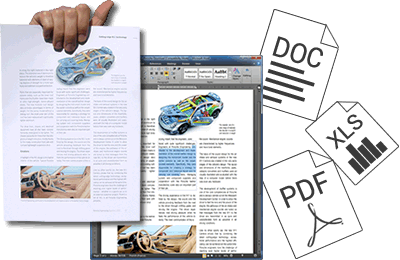 |
Konvertieren Sie Ihre Dokumente in bearbeitbare Dateien (Word, PDF, Excel ...)
Mit dem IRIScan Anywhere 3 erhalten Sie eine Vollversion der OCR-Anwendung Readiris, mit der Sie Textbereiche Ihrer gescannten Dokumente in vollständig bearbeitbare Word-, Excel- oder PDF-Dokumente konvertieren können. Ihre Dateien werden konvertiert und können dann bearbeitet, archiviert.
Weitere Informationen zu Readiris™ 14 |
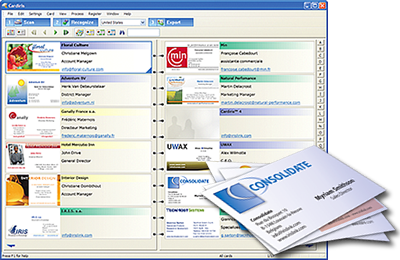
Scannen Sie Ihre Visitenkarten
|
 |
 |
Über 130 unterstützte Sprachen
Die enthaltene OCR-Software (Readiris™ 14) ist einfach die beste mehrsprachige OCR-Software auf dem Markt. Sie erkennt über 130 Sprachen, einschließlich asiatische Sprachen und Arabisch !
Weitere Informationen zu Readiris™ 14 |
Holen Sie sich Ihr IRIScan Anywhere 3Kabellos, akkubetrieben und sehr leicht – Kein Computer zum Scannen nötig! |
|
| Scanner specifications | Minimum computer requirements | |
| Document feeding: Sheet feed type (single) - Resolution: Low resolution : 300 dpi (default) - High resolution : 600 dpi - Document size (max): Up to A4/letter size - Interfaces: SD, xD, MS, MS Pro, MMC (for optional memory) - USB slave (type-B Mini) (for computer connection) - USB host (type-A) for USB key (for optional memory) - Output file format: JPEG - Flash memory: 512MB (expandable with SD™ card or USB key) - Battery: Lithium-ion polymer rechargeable battery through USB cable - Scanning capacity when fully charged : up to 100 A4 documents based on test conditions - Charging method: USB cable |
Software suite for Windows® - Intel® Pentium® III or above. - Microsoft® Windows® 10, 8, 7, Vista® or XP (SP3). - 512MB RAM (1GB recommended). - CD-ROM drive. Software suite for Mac OS® - A Mac® computer with Intel® processor. - Mac OS® X version 10.6 and above. - 512MB RAM (1GB recommended). - CD-ROM drive. |
| Box content | Quick reference guide | |
| - IRIScan™ Anywhere 3 scanner - USB cable - Free MicroSD™ card voucher - Calibration sheet - Software suite for PC and Mac® on CD-ROM - Quick user guide on CD-ROM //Content might change without prior notice depending on the production and components constraints. |
- Product name: IRIScan™ Anywhere 3 - SKU: 457485 - Box size: 13,8 x 30,8 x 5,8 cm (5.43 x 12.12 x 2.28 in) - Box weight: 1000g (2.20 lbs) - Scanner size: 4,4 x 27 x 5,4 cm (1.73 x 10.62 x 2.12 in) - Scanner weight: 390g (0.86 lbs) |
| Documentation | Download | |
|
Download
Quick User Guide: The Quick User Guides provide general guidelines for installing and using the product.
User Guide: The User Guides cover all the features available in the product. Quick Tutorials: The Quick Tutorials address critical steps to take when using the product. |
Brochure English - French - Dutch - German - Spanish - Italian - Portuguese - Polish - Latam Software For Windows - For Macintosh |
 |
ANY QUESTION?
|
 |
Get technical support
|
© 2023 IRIS S.A All rights reserved.