|
|
|

|
|
|
SCAN ALL YOUR DOCUMENTS ANYWHERE
SCAN YOUR CONTRACTS, DOCUMENTS & RECEIPTS ON THE ROAD
IRIScan Anywhere 3 is designed to help you stay organized and optimize your time. No more need to run back to the office or home in order to send that contract or even revise it. IRIScan Anywhere 3 allows you to:
Enjoy today a more organize and time effective way of doing business! Enjoy this special offer. Order it today for $79.00 |
 |
Scan your documents anywhere
Letters, contracts, invoices, receipts, bills, handwritten correspondence, photos or business cards. Scan anything, wherever you are!
Simply charge the scanner with an USB cable, unplug it and scan everywhere without computer. The scanned documents are stored into the internal memory (512 MB), the SD card (included), or a USB flash drive. |
Access your documents anywhere!
IRIScan™ Anywhere 3 is provided with the new Readiris™ 14 to make it easy for you to securely store all your documents in the Cloud (Dropbox, Evernote, Box.net & Googke Docs). You will now be able to access your files anywhere you are from your desktop, mobile phone or tablet. Your paperless office is now also in your pocket!
Learn more about Readiris™ 14 |
 |
 |
Never retype text again
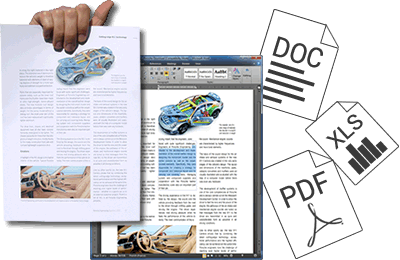
No matter how high the pile of paper you need to scan, the provided world-renowned OCR software Readiris™ 14 will extract all key information easily. Your documents are turned into fully editable files in Word, Pages, Excel, etc. ready to be shared in the Cloud (Dropbox, Evernote, Google Drive, Skydrive, and more)
Learn more about Readiris™ 14 |
Scan & convert your business cards
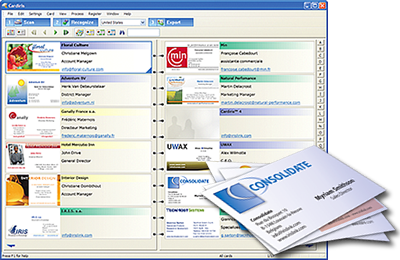
The IRIScan™ Anywhere 3 Wifi also lets you quickly scan the stack of business cards you have been collecting for so long, or right on the spot when you meet a business partner at a trade show or in a meeting. You can then automatically extract all their data with the provided business cards recognition software Cardiris™, and export your digital contacts to Outlook, Excel, Salesforce, ACT!, and more!
Supported Cloud services: Evernote, Dropbox, Box & Google Drive |
 |
 |
130+ supported languages
The embedded OCR technology is the most powerful multi-lingual recognition software on the market. It recognizes over 130 languages including Asian languages and Arabic! Click here to discover if your language is one of them!
|
Get your IRIScan Anywhere 3Cordless, battery-powered and very lightweight. No computer needed to scan! |
|
| Scanner specifications | Minimum computer requirements | |
| Document feeding: Sheet feed type (single) - Resolution: Low resolution : 300 dpi (default) - High resolution : 600 dpi - Document size (max): Up to A4/letter size - Interfaces: SD, xD, MS, MS Pro, MMC (for optional memory) - USB slave (type-B Mini) (for computer connection) - USB host (type-A) for USB key (for optional memory) - Output file format: JPEG - Flash memory: 512MB (expandable with SD™ card or USB key) - Battery: Lithium-ion polymer rechargeable battery through USB cable - Scanning capacity when fully charged : up to 100 A4 documents based on test conditions - Charging method: USB cable |
Software suite for Windows® - Intel® Pentium® III or above. - Microsoft® Windows® 10, 8, 7, Vista® or XP (SP3). - 512MB RAM (1GB recommended). - CD-ROM drive. Software suite for Mac OS® - A Mac® computer with Intel® processor. - Mac OS® X version 10.6 and above. - 512MB RAM (1GB recommended). - CD-ROM drive. |
| Box content | Quick reference guide | |
| - IRIScan™ Anywhere 3 scanner - USB cable - Free MicroSD™ card voucher - Calibration sheet - Software suite for PC and Mac® on CD-ROM - Quick user guide on CD-ROM //Content might change without prior notice depending on the production and components constraints. |
- Product name: IRIScan™ Anywhere 3 - SKU: 457485 - Box size: 13,8 x 30,8 x 5,8 cm (5.43 x 12.12 x 2.28 in) - Box weight: 1000g (2.20 lbs) - Scanner size: 4,4 x 27 x 5,4 cm (1.73 x 10.62 x 2.12 in) - Scanner weight: 390g (0.86 lbs) |
| Documentation | Download | |
|
Download
Quick User Guide: The Quick User Guides provide general guidelines for installing and using the product.
User Guide: The User Guides cover all the features available in the product. Quick Tutorials: The Quick Tutorials address critical steps to take when using the product. |
Brochure English - French - Dutch - German - Spanish - Italian - Portuguese - Polish - Latam Software For Windows - For Macintosh |
 |
ЕСТЬ ВОПРОСЫ?
|
 |
Получите техническую поддержку
|
© 2023 IRIS S.A All rights reserved.